
How to Enable Right-to-Left (RTL) Layout in Google Forms
While Google Forms supports text input in right-to-left languages, the actual layout—including checkboxes, radio buttons, and alignment—often stays locked in a left-to-right orientation. This can make forms look unprofessional to native speakers.
With CustomGForm, you can mirror your entire form layout with a single toggle, ensuring a seamless user experience for languages like Arabic, Hebrew, Persian (Farsi), and Urdu.
Prerequisite
Before starting, make sure you have connected your Google Form to your CustomGForm dashboard.
Provide a fully localized right-to-left form experience.
Step-by-Step Guide
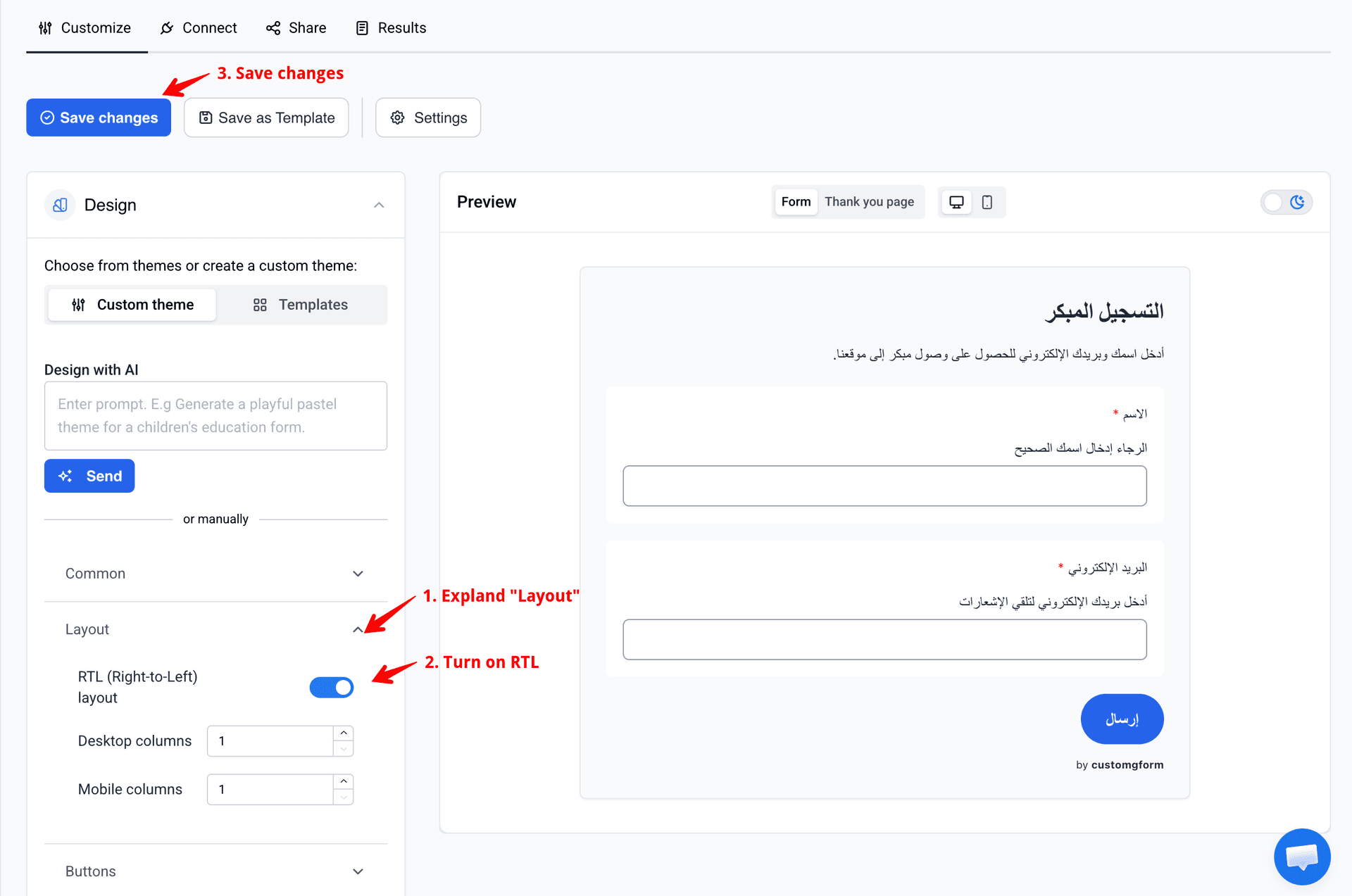
Set your form language in Google Forms
Ensure your original Google Form text (questions and descriptions) is written in your target RTL language (e.g., Arabic or Hebrew).
Open your form in CustomGForm
Log into your CustomGForm dashboard and select the form you want to customize.
Expand the Layout panel
In the left-hand customization sidebar, look for and click on the Layout section to expand its options.
Enable the RTL toggle
Locate the RTL (Right-to-Left) layout toggle switch and flip it to On. You will immediately see your form components, labels, and alignment mirror correctly in the live preview.
Save your changes
Click the Save changes button in the top right corner to publish your beautifully formatted RTL form.
Frequently Asked Questions
Which languages require an RTL layout in Google Forms?
You should enable the RTL layout option if your form is written in Arabic, Hebrew, Persian (Farsi), Urdu, Yiddish, or Dhivehi. Turning this on ensures that input fields, radio buttons, and multi-page navigation arrows flow naturally from right to left.
Will turning on RTL affect my Google Forms response sheet?
No. CustomGForm only modifies the visual presentation layer for your end-users. All submission data is passed back securely to your standard Google Sheets destination exactly as it normally would, without changing data columns or formatting.
Last updated on
How to Save and Reuse Theme Templates for Google Forms
Save your favorite Google Forms colors, fonts, and styles into reusable theme templates to apply across all your forms.
How to Remove "by customgform" Copyright and Branding
Learn how to remove the "by customgform" watermark branding footer from your embedded Google Forms on Starter and Pro plans.