
Form Analytics
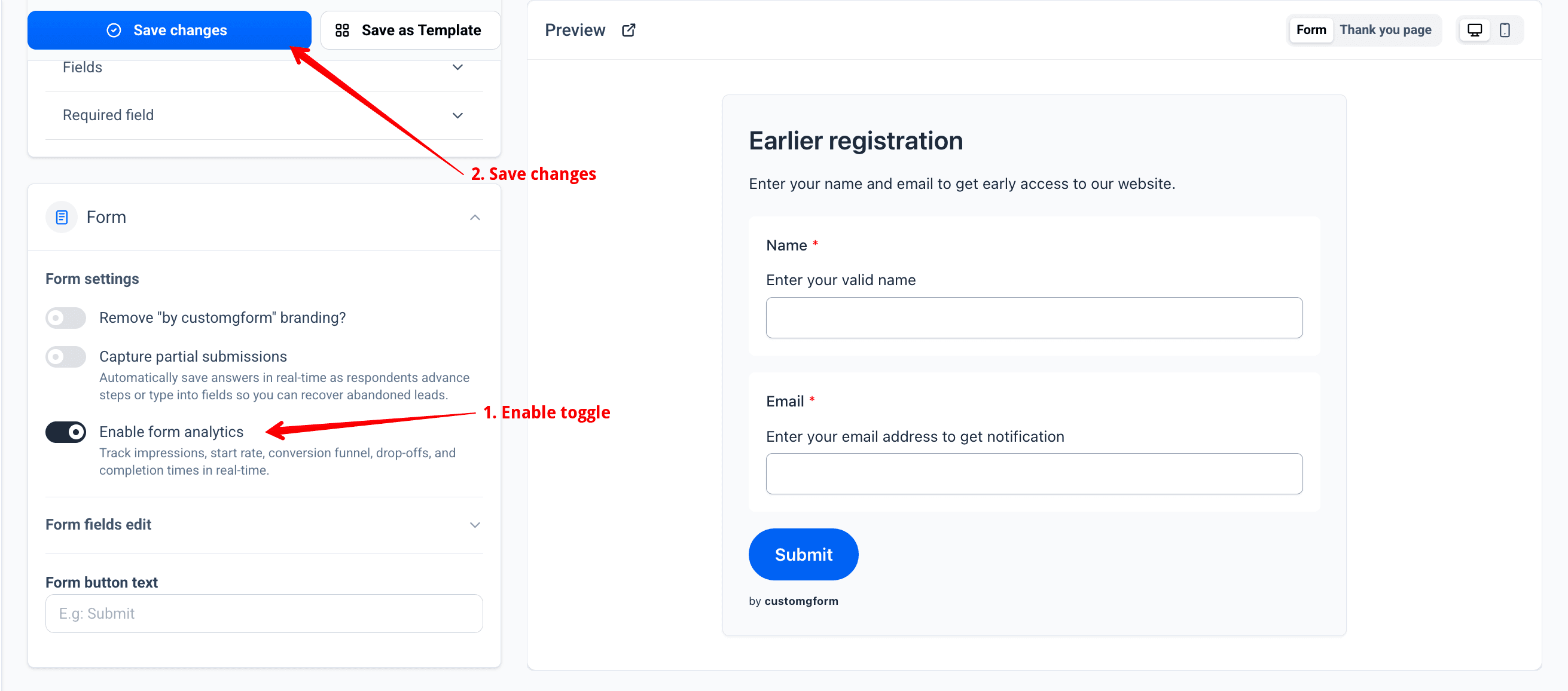
Plan Availability: Form Analytics is available on Starter and Pro plans. To begin tracking, open your form customizer, navigate to Form Settings, and switch on Enable form analytics.
Understand how visitors discover, engage with, and complete your embedded Google Forms. CustomGForm comes with built-in, privacy-friendly form analytics that track views, start rates, multi-step drop-offs, and completion times — with zero complex tag configurations required.
You can view analytics directly in your CustomGForm dashboard, export full CSV reports, query performance using our AI & MCP assistant, or stream events to your existing Google Analytics 4 setup.
How to enable Form Analytics
Turn on form analytics in settings
- Open your form in the CustomGForm customizer.
- In the left panel, expand the Form section under Form Settings.
- Switch on the Enable form analytics toggle.
- Click the blue Save changes button at the top to activate telemetry tracking.
Go to Results and view your analytics report
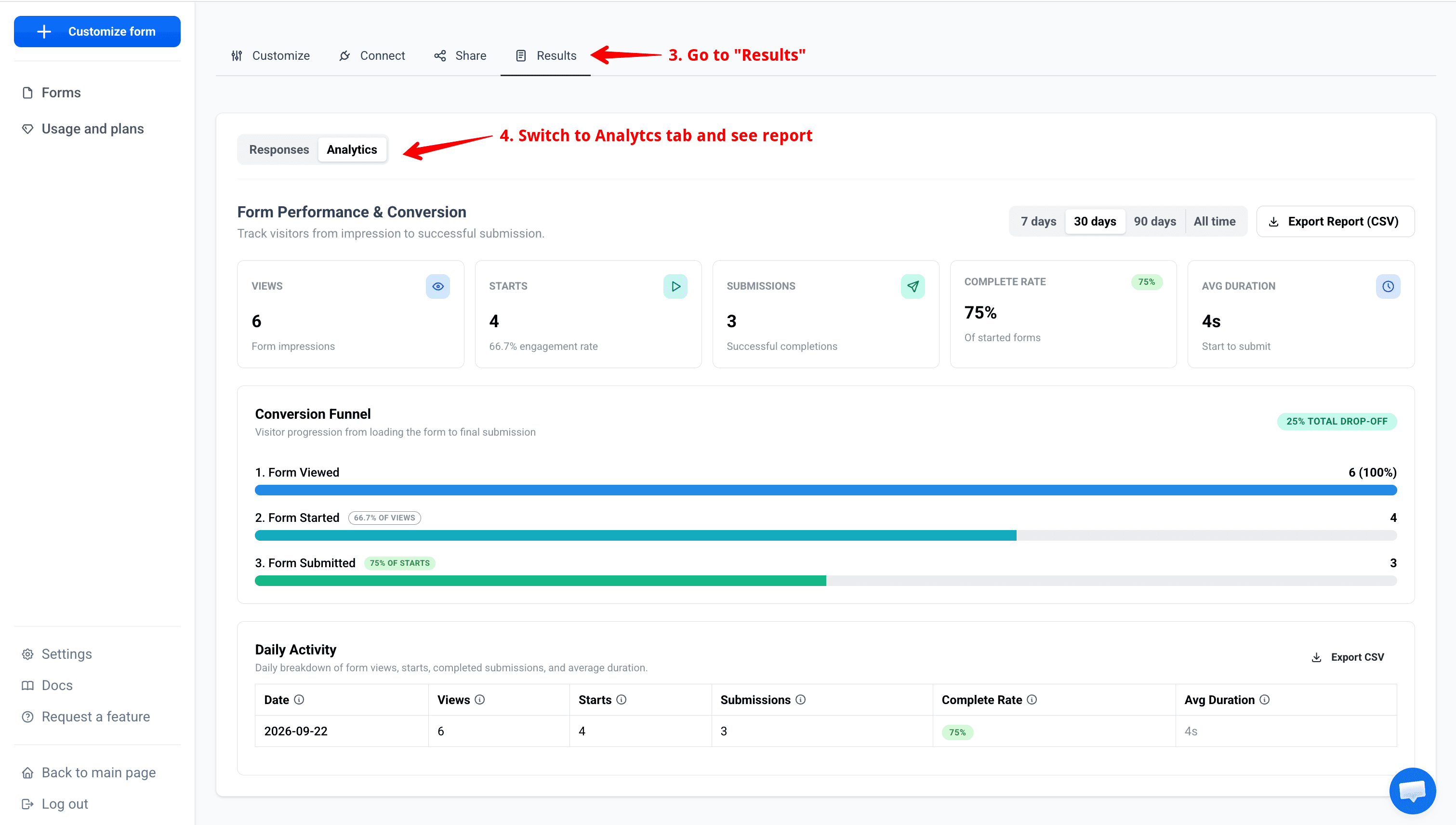
- In the top navigation bar, switch to the Results tab.
- Click on the Analytics sub-tab to inspect your real-time performance dashboard.
- Track overall Views, Starts, Submissions, Complete Rate, and Average Duration, alongside visual Conversion Funnels and Daily Activity tables.
Key capabilities
- Native Analytics Dashboard: Instant visibility into key metrics inside the Analytics tab of every form.
- Three-Stage Conversion Funnel: Monitor user progression through Views → Starts → Submissions to see where respondents drop off.
- Step-by-Step Drop-Off Tracking: For multi-page forms, identify exactly which pages or questions cause friction and abandonment.
- Average Completion Duration: See how long respondents take to fill out and submit your form.
- Daily Activity Timeline: Track trends over time with daily breakdowns of impressions, interactions, and conversion rates.
- One-Click CSV Exports: Download full reports, daily activity logs, or step retention data for spreadsheets and BI reporting.
- AI & MCP Compatible: Ask natural language questions in Ask AI or via MCP tools to analyze trends and download CSVs on demand.
- Google Tag Manager & GA4 Passthrough: Push standard events directly to your
window.dataLayerfor consolidated web analytics.
Core Metrics
CustomGForm tracks five core performance metrics for every form:
| Metric | Description |
|---|---|
| Total Views | Number of times your embedded form was loaded on a page (session-deduplicated). |
| Total Starts | Number of unique sessions where a visitor interacted with a form field (first keystroke or selection). |
| Submissions | Total number of successfully completed form submissions. |
| Conversion Rate | Overall percentage of form views that converted into completed submissions (Submissions / Views × 100%). |
| Avg Duration | Average time spent filling out the form, measured from first interaction to submission. |
Analytics can be filtered across multiple timeframes: Last 7 days, Last 30 days, Last 90 days, or Lifetime.
Conversion Funnel & Step Drop-offs
The 3-Stage Conversion Funnel
The conversion funnel visualizes how effectively your form moves visitors from initial impression to final submission:
- Views (Impressions): Visitor arrives on a page with your embedded form.
- Starts (Engagement): Visitor types into a field, clicks a radio option, or checks a box.
- Submissions (Conversions): Form is validated and successfully submitted to Google Forms.
Multi-Step Form Drop-offs
For forms with multiple pages or sections, CustomGForm tracks views and drop-offs at every step:
- Step Number: The sequential page of your form (Step 1, Step 2, Step 3, etc.).
- Step Views: How many visitors reached this particular step.
- Drop-offs: Number of visitors who reached this step but left before advancing or submitting.
- Drop-off Rate: Percentage of visitors lost at this step (
Drop-offs / Step Views × 100%).
Use this table to spot question fatigue, confusing fields, or unexpected blockers on specific form pages.
Exporting Analytics to CSV
You can export your form's data directly to CSV at any time for Excel, Google Sheets, or custom data pipelines:
- Full Analytics Report: A complete report containing KPI summary totals, multi-step drop-off retention, and daily activity logs.
- Daily Activity CSV: A day-by-day table of views, starts, submissions, conversion rates, and average completion durations.
- Step Retention CSV: A step-by-step breakdown of retention and drop-off rates across form pages.
Programmatic REST API
Analytics data and CSV reports can also be fetched via the REST API:
# Fetch JSON analytics summary
GET /api/form/:id/analytics?days=30

# Export direct CSV file attachment
GET /api/form/:id/analytics?days=30&format=csv
Ask AI & MCP Assistant
CustomGForm integrates analytics directly into our AI Assistant and Model Context Protocol (MCP) server. You can ask questions in natural language, uncover insights, or generate reports without leaving your conversation:
Example Prompts
- "How did my contact form perform over the last 30 days?"
- "What is the drop-off rate on step 2 of my survey?"
- "Compare this week's form conversion rate to last week."
- "Generate and export a CSV report for the last 90 days of analytics."
When you ask for analytics, the AI displays interactive KPI cards, summary breakdowns, and one-click Download CSV and Copy CSV actions directly inside the chat window.
Google Tag Manager & GA4 Integration
If you already use Google Analytics 4 or Google Tag Manager on your website, CustomGForm automatically pushes events into window.dataLayer:
| Event Name | Trigger |
|---|---|
cgf__view | Form rendered in visitor viewport |
cgf__start | First user focus or input interaction |
cgf__step_view | Respondent advances to a new step |
cgf__submission | Form successfully submitted |
GTM passthrough requires no separate API keys — CustomGForm detects your existing container on the host page and dispatches events automatically.
Privacy & Performance
CustomGForm analytics are built to be ultra-lightweight and respectful of visitor privacy:
- Zero-cookie telemetry: Tracking uses ephemeral session IDs and privacy-safe one-way IP hashing. No cookies are stored on your visitors' devices.
- Non-blocking beacons: Telemetry requests use
navigator.sendBeacon(with a lightweightfetchfallback) so form tracking never delays page rendering or form submissions. - GDPR & CCPA Friendly: No personally identifiable information (PII) is recorded in analytics logs.
Webhooks Integration for Google Forms
Stream Google Forms responses in real-time to Zapier, Make, n8n, Slack, or your custom API backend via CustomGForm webhooks.
Reliable Response Collection & Backup for Google Forms
Capture and store Google Forms submissions with real-time backup, search, filtering, and CSV export in CustomGForm.