
Capture Partial Responses in Google Forms
Over 68% of visitors who start filling out an online form leave before clicking submit. Whether they get distracted, run out of time, or second-guess on a later question, standard Google Forms treats them as if they never existed: you get zero data and lose high-intent leads forever.
CustomGForm Partial Responses changes this by automatically saving answers in real time as respondents type into fields or advance through form steps. Even if someone closes their tab halfway through, you capture their contact details, discover where they abandoned, and can reach out to close the deal.
Stop losing 70% of your Google Form leads
Turn abandoned form visits into pipeline revenue. Automatically capture partial submissions and follow up with interested prospects.
Start 7-Day Free Trial →
How to enable Partial Responses
Watch a quick walkthrough on enabling partial response capture and inspecting abandoned leads.
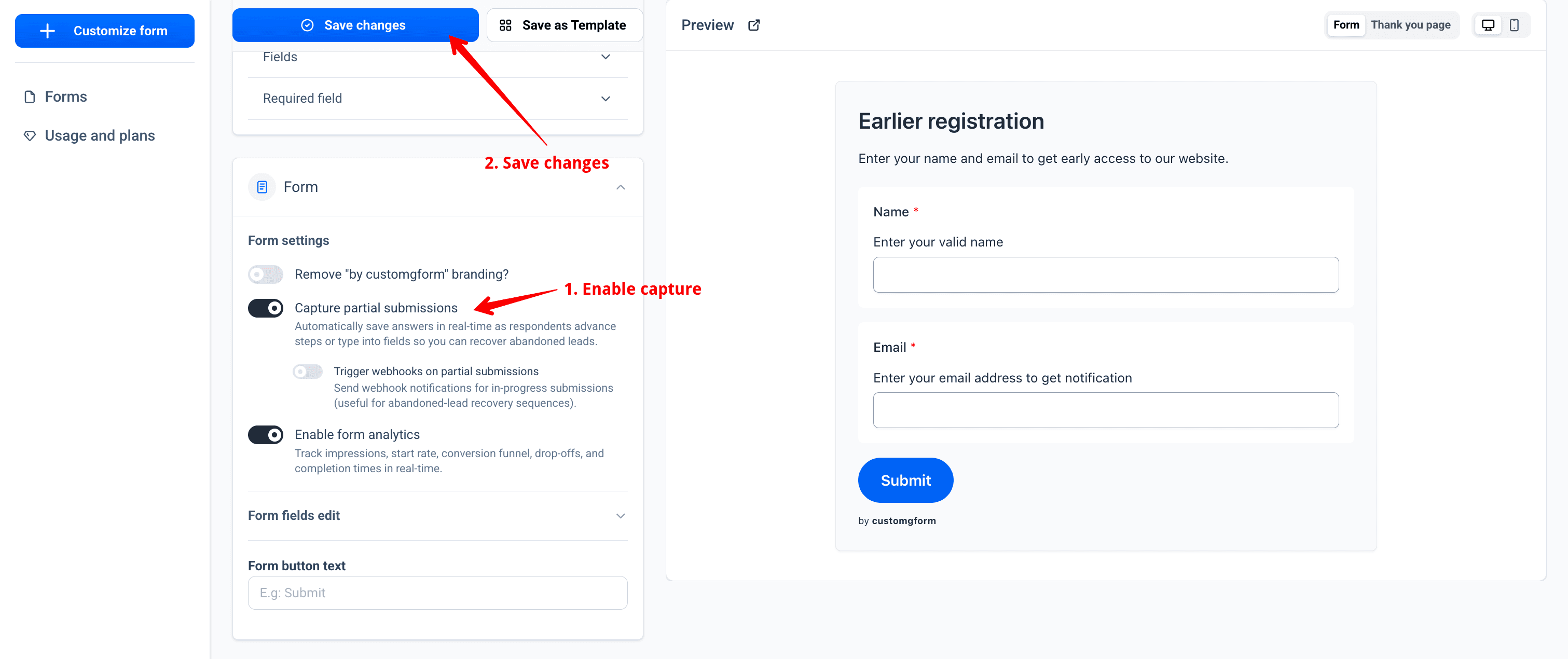
Turn on partial submission capture in settings
- Open your form in the CustomGForm customizer.
- In the left panel, expand the Form section under Form Settings.
- Switch on the Capture partial submissions toggle (optionally, also turn on Trigger webhooks on partial submissions for automated lead recovery alerts).
- Click the blue Save changes button at the top to activate real-time saving.
Go to Results and review partial responses
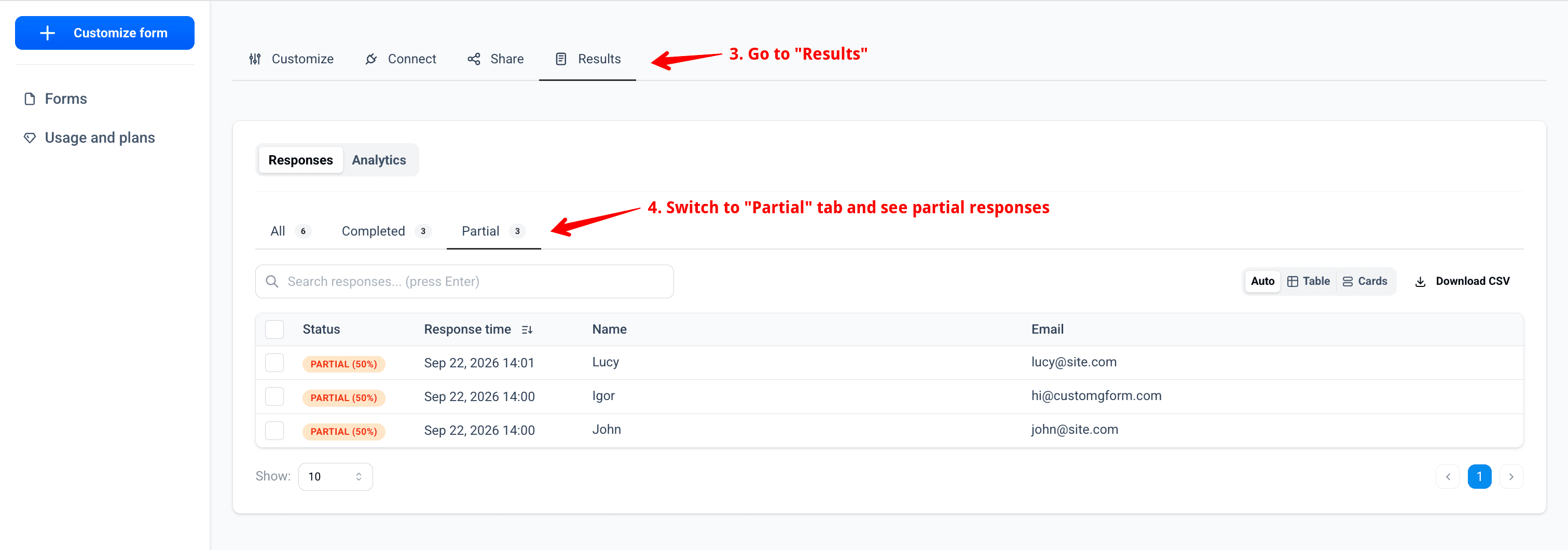
- In the top navigation bar, click on the Results tab.
- Under Results, switch to the Partial sub-tab.
- Review captured in-progress submissions with respondent details, timestamps, and drop-off completion percentages (e.g. 50%). You can search, inspect field answers, or download a CSV.
Why You Need Partial Form Capture
When a potential customer visits your website and begins typing their name, email, or requirements into your form, they are demonstrating maximum buying intent.
Losing that lead simply because they didn't complete question 7 is a massive leak in your acquisition funnel:
- Recover Abandoned Inquiries: Follow up with prospects who entered an email or phone number on step 1 but dropped off on step 2 or 3.
- Pinpoint Friction Points: Identify the exact question or step where respondents hesitate and abandon, so you can optimize your form structure.
- Double Your Pipeline Without More Ad Spend: Generating new website traffic is expensive. Capturing partial submissions maximizes the ROI of your existing visitors.
- Automated Lead Nurturing: Trigger real-time webhooks directly to your CRM, Slack, Zapier, or Make the moment an in-progress response is registered.
Key Capabilities
- Real-Time Auto-Save: Automatically detects and captures user keystrokes with intelligent debouncing on single-step forms and on page leave/tab switch.
- Multi-Step Wizard Tracking: Automatically captures progress as respondents advance between steps in multi-page forms, recording the step number, step title, and completion percentage (e.g. 33%, 66%).
- Dedicated Results Dashboard with Tabs: Filter responses between All, Completed, and Partial with live counts in your CustomGForm dashboard.
- Session Continuity (No Duplicates): When a user who started a partial submission eventually completes and submits the form, CustomGForm upgrades their existing record to Completed rather than creating messy duplicate rows.
- Zero Login Friction for Respondents: Respondents don't need a Google account or special app. The feature runs seamlessly behind the scenes on your embedded website form.
- Instant Webhook Dispatches: Send automated webhook notifications for partial entries, enabling instant email or SMS recovery campaigns.
- One-Click CSV Export: Export all responses or filter by status (
responses_formId_partial.csv/responses_formId_completed.csv) with full timestamp and drop-off step metadata. - AI & MCP Assistant Enabled: Ask your AI assistant to search for partial submissions, summarize drop-off rates, or export CSV data in plain English.
Native Google Forms vs. CustomGForm
| Capability | Standard Google Forms | CustomGForm Pro |
|---|---|---|
| Incomplete answer capture | ❌ Discarded completely | ✅ Saved in real time |
| Drop-off step tracking | ❌ Not available | ✅ Exact step name & percentage |
| Webhook alerts on abandoned leads | ❌ No | ✅ Instant webhook notification |
| Filtered responses view | ❌ No (all or nothing) | ✅ Tabs: All, Completed, Partial |
| No Google login required | ⚠️ Draft save requires Google login | ✅ 100% login-free for visitors |
| AI Assistant querying & CSV export | ❌ No | ✅ Native Ask AI & MCP tools |
| Export partial responses to CSV | ❌ No | ✅ One-click CSV download |
Automated Lead Recovery via Webhooks
Want to automatically email or Slack your sales team when someone starts a form but drops off?
When you enable Trigger webhooks on partial submissions, CustomGForm sends a structured JSON payload to your webhook URL whenever a partial entry is recorded:
{
  "formId": "cmsg6xv4h0001c9t0itmu3gtp",
  "responseId": "resp_987654321",
  "status": "PARTIAL",
  "submittedAt": "2026-09-12T11:45:00.000Z",
  "meta": {
    "isWizard": true,
    "currentStep": 1,
    "totalSteps": 3,
    "stepTitle": "Contact Information",
    "completionPercentage": 67
  },
  "data": [
    {
      "id": "1580584109",
      "label": "Your Full Name",
      "value": "Alex Morgan"
    },
    {
      "id": "939523427",
      "label": "Business Email",
      "value": "[email protected]"
    }
  ]
}
Example Recovery Sequence
- Visitor fills in their Name and Email on Step 1, but leaves on Step 2.
- CustomGForm dispatches the webhook to Zapier or your CRM.
- Your CRM waits 30 minutes. If no completed submission has arrived, it sends a gentle email:
"Hi Alex, noticed you started our application. Do you have any quick questions we can help answer?"
- You convert a lead who would have otherwise been lost forever.
Frequently Asked Questions
Does Google Forms save partial responses natively?
No. Google Forms only records an entry when a respondent navigates to the very end of the form and clicks the "Submit" button. If a user closes the browser tab, navigates away, or loses internet connection before submitting, all entered data is permanently lost. CustomGForm solves this by securely capturing and updating responses in real time.
What happens when a partial respondent later submits the form?
CustomGForm uses a persistent, privacy-preserving session identifier (sessionId). When a respondent who previously recorded a partial response finishes the form and clicks "Submit", their existing partial record is automatically updated to Completed with 100% completion progress. You will never have confusing duplicate records for the same submission.
Will respondents be slowed down?
No. Partial submissions are sent asynchronously in the background using lightweight network requests and intelligent debouncing. Your form remains silky smooth, responsive, and fast.
Which plan includes Partial Responses?
Capture Partial Submissions is an advanced lead recovery feature available on the Pro plan. You can test it immediately with our 7-day free trial.
Can I search and filter partial responses with AI?
Yes! CustomGForm's built-in AI Assistant and external MCP integrations can query your submissions directly. You can ask:
- "Show me partial responses from the last 7 days"
- "How many respondents dropped off on the contact step?"
- "Export all partial submissions to a CSV file"
Learn More
- Form Analytics — Track impressions, start rates, and conversion funnels
- Collect Responses — Search, filter, and inspect form data
- Webhooks Integration — Connect forms to external CRMs and notification channels
- Pricing Plans — Compare Hobby, Starter, and Pro features
Last updated on
CustomGForm Features & Capabilities
Explore CustomGForm features: custom themes, dark mode, e-signatures, file uploads without login, location detection, webhooks, and AI automation.
File Upload Addon for Google Forms Without Login
Accept file uploads on public Google Forms without requiring Google sign-in. Set custom file size and extension restrictions.